Open Source · 2023
Quick Command
QuickCommand is a macOS menu bar app for people who reuse commands, prompts, replies, and text snippets all day. Save once, summon it instantly with a global shortcut, and paste into the app you are already using.
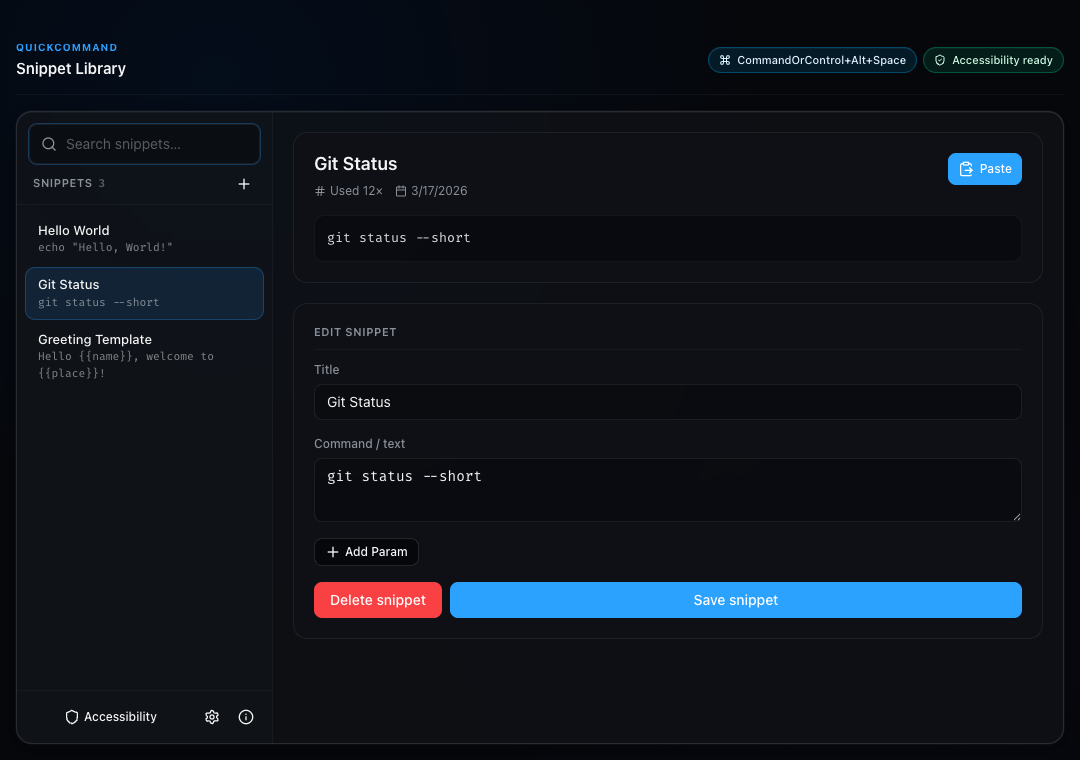
Built for fast hands-off insertion, QuickCommand combines a command palette, a compact menu bar popover, and a full snippet library in one local-first desktop app.
CASE STUDY
- 01
CHALLENGE
I run the same shell commands, prompts, and reply snippets every day. Every launcher I tried was too heavy, too cloud-dependent, or missed the global-shortcut flow I actually wanted.
- 02
SYSTEM DECISION
Built a local-first macOS app — menu bar popover, global command palette, full library view — backed by fuzzy search that weights recency and use count. No accounts, no sync, no server.
- 03
OUTCOME
Shipped free and open source.
One shortcut away from pasting into whatever app I'm in. Recognized in the Apple Developer Academy cohort for the macOS app track.
FEATURES
- 01Global command palette for keyboard-first search and paste
- 02Menu bar popover for quick access without opening the full library
- 03Snippet library window with create, edit, delete, search, import, and export
- 04Parameterized snippets using placeholders like {name} and {place}
- 05Onboarding flow for Accessibility permission and shortcut setup
- 06Customizable settings for launch at login, startup behavior, and clipboard restore delay
- 07Usage-aware search powered by fuzzy matching plus recency/use-count sorting
STACK
- React
- Node.js
- Electron
- macOS
- Bun